网页
综合
更新时间 2026-11-13 17:22:16
Documentation — isx
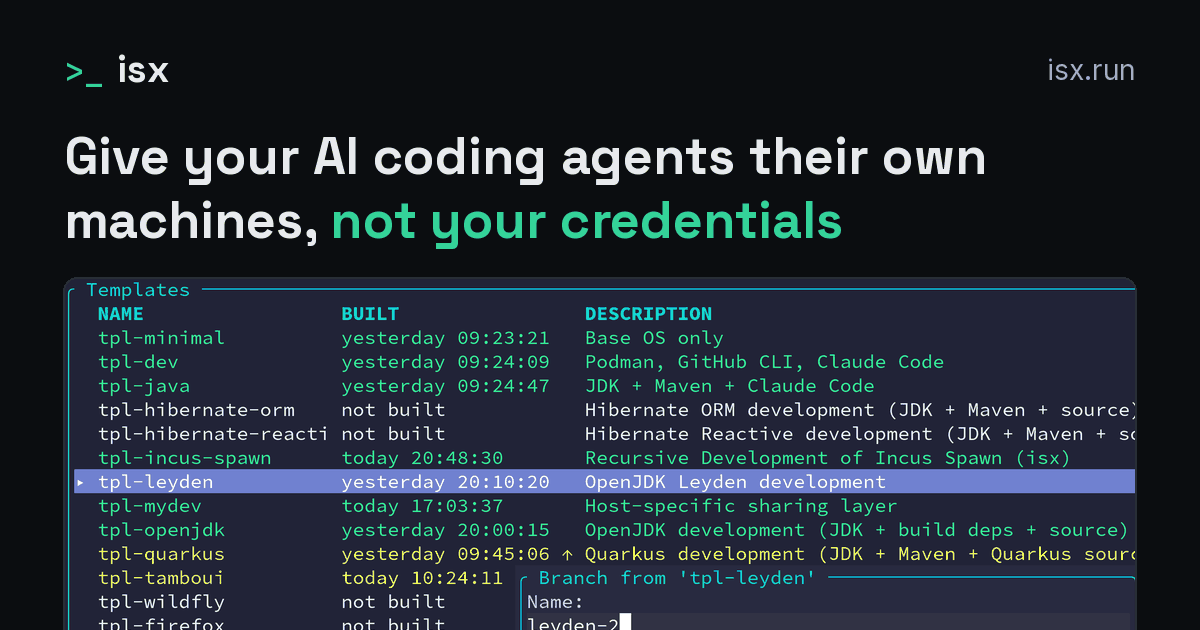
Give your AI coding agents their own machines, not your credentials. isx.run is the website, with the full documentation.
An AI agent in your terminal can read your API keys, your GitHub token, your ~/.ssh and every repo you have checked out. Your IDE and build tools execute anything the agent writes.
isx onboards agents the way you'd onboard a new teammate:
Each agent works in its own machine and asks for no approval, so you can run many side by side and build automations that run with nobody watching. isx runs on Linux and macOS, on your hardware, and your repositories and credentials stay there.
Agents are the main use, not the only one. The same disposable machines are ideal for triaging untrusted patches, reproducing bug reports and testing on a clean system.
Built with Quarkus and Tamboui, powered by Incus system containers. Written in Java, compiled to native binaries with GraalVM. isx was formerly known as incus-spawn.
Requires Linux, or macOS 15 (Sequoia) or later (Installation); isx init sets up the rest, or your coding agent can do it all for you.
The package is called incus-spawn, and it installs the isx command.
On a fresh Linux host, isx init adds you to the incus-admin group and finishes its run in that group. Other terminals get the group at your next login, or in each one with newgrp incus-admin.
A template is a machine image you build once: an OS, tools and repos. The template below adds Claude Code to the built-in tpl-minimal template. Save it as ~/.config/incus-spawn/images/tpl-agent.yaml, or run isx templates new tpl-agent and paste it over the skeleton that opens in your editor:
Claude Code signs in with the Claude credential you set up in isx init; isx account add claude adds one later. Claude Code never sees the credential: the proxy adds the credential to each request after the request leaves the instance. If you did not install the services isx init offers, start them before building: isx proxy start on Linux, isx vm start && isx proxy start on macOS.
For another agent, replace claude with codex, pi, gemini-cli, bob or copilot; see Agents. Pi uses your Claude credential too, unless its provider names another API (Pi). To give the agent a project, add repos: (Declarative Repos). Its commits come back to your host with git fetch (Git Remotes).
The agent must be free to act, so its instance cannot hold anything worth stealing. API keys and tokens never enter an instance in any form. Instead, a proxy on your host (isx proxy) adds the real credentials to the agent's requests as the requests leave the instance, so curl, git, gh, claude and pi work unmodified inside it.
What the proxy can sign in as:
A credential can have several accounts, for example a personal and a client Claude subscription, or two GitHub identities. Each template or instance chooses which account it uses: see Credential accounts. Git must use HTTPS URLs, not SSH; gh defaults to HTTPS.
The proxy must be running for every instance that has a network. isx init installs it as a service, systemd on Linux and launchd on macOS, or you run isx proxy start in a terminal of its own. isx checks that the proxy is reachable and compatible before a build, a branch or a shell.
The proxy also caches container image layers and build artifacts on the host, so the same dependency is never downloaded twice (Caching).
Each start replaces the placeholders with proof tokens unique to the instance and the credential, such as gho_isx_… in GH_TOKEN, exported by the login profile. The proxy adds an instance's credentials only to requests carrying its proof token. The tokens stay the same across stops, starts and reboots, so a nested service you configured with one keeps working.
Only what runs in the instance's login environment receives the proof tokens, so a nested container gets none unless you pass one in. Plain Git is the exception: for its HTTPS requests to github.com, a credential helper isx installs presents the GitHub proof token even outside a login shell.
Credential proofs says how to share or revoke proof tokens, and what to do after an upgrade.
With a GitHub token configured, every instance gets a ready-made .gitconfig: your GitHub name and email, the private @users.noreply.github.com address when there is one, and sensible defaults.
Commit signing is not supported inside an instance yet (#271). To sign, fetch the changes to your host through git remotes and rebase there.
A branch is an instance made from a template, the way git branch makes a branch from a commit: an instant copy-on-write clone. It has its own filesystem, and nothing it changes reaches the template or another branch.
The storage backend (btrfs, zfs or lvm) shares the unchanged data, so a branch uses disk space only for what it changes. isx init creates a btrfs storage pool if there is none.
Install packages, break things, and destroy the branch when done. Sudo works without a password, and the shell sets the terminal title to isx:<name>, so you always know which instance you are in.
What a branch can have, each on request:
The TUI (isx with no arguments) is a Midnight Commander-style view of your templates and branches. It has dialogs for branching, renaming and building, F3 for an instance's details and F9 for tool actions.
Without function keys, press the digit instead: 1 to 0 stand for F1 to F10, and Alt with a digit stands for Shift with that function key. On macOS, Alt is Option once the terminal sends Option as Meta.
A storage gauge and per-row disk usage show what is filling the pool. Sizes are approximate (~): the base template carries the shared base image, and each branch only its own data. Press C to reclaim space, or on macOS grow the disk with isx vm resize <size>.
Templates pre-install your baseline tools and repos. Integrations are installed through the same tool system: VS Code Remote, JetBrains Gateway and agent skills.
Each branch runs in one of three network modes:
An instance is isolated, but the work done in it has to reac
An AI agent in your terminal can read your API keys, your GitHub token, your ~/.ssh and every repo you have checked out. Your IDE and build tools execute anything the agent writes.
isx onboards agents the way you'd onboard a new teammate:
Each agent works in its own machine and asks for no approval, so you can run many side by side and build automations that run with nobody watching. isx runs on Linux and macOS, on your hardware, and your repositories and credentials stay there.
Agents are the main use, not the only one. The same disposable machines are ideal for triaging untrusted patches, reproducing bug reports and testing on a clean system.
Built with Quarkus and Tamboui, powered by Incus system containers. Written in Java, compiled to native binaries with GraalVM. isx was formerly known as incus-spawn.
Requires Linux, or macOS 15 (Sequoia) or later (Installation); isx init sets up the rest, or your coding agent can do it all for you.
The package is called incus-spawn, and it installs the isx command.
On a fresh Linux host, isx init adds you to the incus-admin group and finishes its run in that group. Other terminals get the group at your next login, or in each one with newgrp incus-admin.
A template is a machine image you build once: an OS, tools and repos. The template below adds Claude Code to the built-in tpl-minimal template. Save it as ~/.config/incus-spawn/images/tpl-agent.yaml, or run isx templates new tpl-agent and paste it over the skeleton that opens in your editor:
Claude Code signs in with the Claude credential you set up in isx init; isx account add claude adds one later. Claude Code never sees the credential: the proxy adds the credential to each request after the request leaves the instance. If you did not install the services isx init offers, start them before building: isx proxy start on Linux, isx vm start && isx proxy start on macOS.
For another agent, replace claude with codex, pi, gemini-cli, bob or copilot; see Agents. Pi uses your Claude credential too, unless its provider names another API (Pi). To give the agent a project, add repos: (Declarative Repos). Its commits come back to your host with git fetch (Git Remotes).
The agent must be free to act, so its instance cannot hold anything worth stealing. API keys and tokens never enter an instance in any form. Instead, a proxy on your host (isx proxy) adds the real credentials to the agent's requests as the requests leave the instance, so curl, git, gh, claude and pi work unmodified inside it.
What the proxy can sign in as:
A credential can have several accounts, for example a personal and a client Claude subscription, or two GitHub identities. Each template or instance chooses which account it uses: see Credential accounts. Git must use HTTPS URLs, not SSH; gh defaults to HTTPS.
The proxy must be running for every instance that has a network. isx init installs it as a service, systemd on Linux and launchd on macOS, or you run isx proxy start in a terminal of its own. isx checks that the proxy is reachable and compatible before a build, a branch or a shell.
The proxy also caches container image layers and build artifacts on the host, so the same dependency is never downloaded twice (Caching).
Each start replaces the placeholders with proof tokens unique to the instance and the credential, such as gho_isx_… in GH_TOKEN, exported by the login profile. The proxy adds an instance's credentials only to requests carrying its proof token. The tokens stay the same across stops, starts and reboots, so a nested service you configured with one keeps working.
Only what runs in the instance's login environment receives the proof tokens, so a nested container gets none unless you pass one in. Plain Git is the exception: for its HTTPS requests to github.com, a credential helper isx installs presents the GitHub proof token even outside a login shell.
Credential proofs says how to share or revoke proof tokens, and what to do after an upgrade.
With a GitHub token configured, every instance gets a ready-made .gitconfig: your GitHub name and email, the private @users.noreply.github.com address when there is one, and sensible defaults.
Commit signing is not supported inside an instance yet (#271). To sign, fetch the changes to your host through git remotes and rebase there.
A branch is an instance made from a template, the way git branch makes a branch from a commit: an instant copy-on-write clone. It has its own filesystem, and nothing it changes reaches the template or another branch.
The storage backend (btrfs, zfs or lvm) shares the unchanged data, so a branch uses disk space only for what it changes. isx init creates a btrfs storage pool if there is none.
Install packages, break things, and destroy the branch when done. Sudo works without a password, and the shell sets the terminal title to isx:<name>, so you always know which instance you are in.
What a branch can have, each on request:
The TUI (isx with no arguments) is a Midnight Commander-style view of your templates and branches. It has dialogs for branching, renaming and building, F3 for an instance's details and F9 for tool actions.
Without function keys, press the digit instead: 1 to 0 stand for F1 to F10, and Alt with a digit stands for Shift with that function key. On macOS, Alt is Option once the terminal sends Option as Meta.
A storage gauge and per-row disk usage show what is filling the pool. Sizes are approximate (~): the base template carries the shared base image, and each branch only its own data. Press C to reclaim space, or on macOS grow the disk with isx vm resize <size>.
Templates pre-install your baseline tools and repos. Integrations are installed through the same tool system: VS Code Remote, JetBrains Gateway and agent skills.
Each branch runs in one of three network modes:
An instance is isolated, but the work done in it has to reac
本页为82搜索生成的网页快照,内容来自站内索引;演示数据的原文链接仅作示例。