网页
综合
更新时间 2026-10-29 07:30:00
How Casey Liss and Ben McCarthy made Callsheet a go-to for movie fans · Sketch Blog
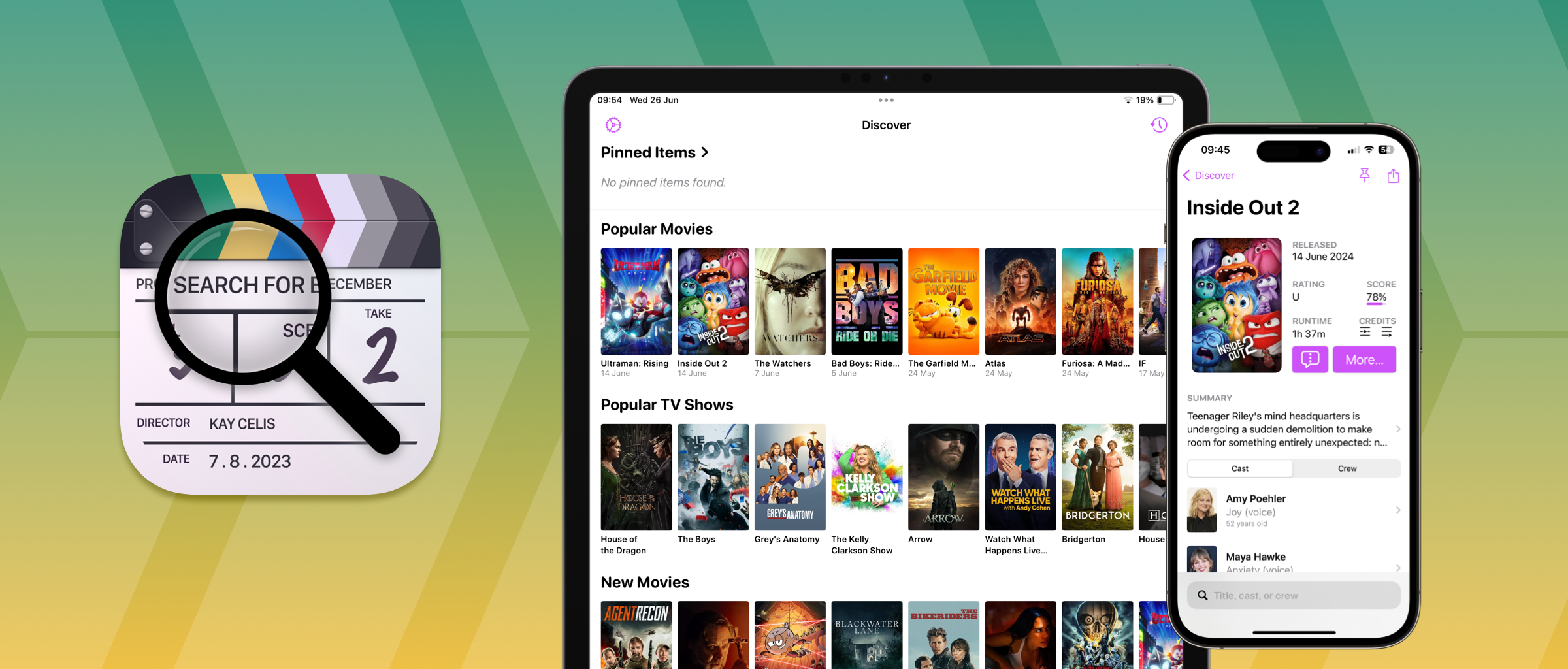
When you’re watching a film or TV show and want to know if the actress in the lead role was also in that other thing you saw, where do you go? The obvious answer is probably IMDb, but as Casey Liss notes, “it has gotten more frustrating to use”. So, he set about building a better alternative.
With design help from Ben McCarthy, Casey built Callsheet — an IMDb alternative for iPhone, iPad and Vision Pro. Calling it an IMDb alternative is almost a disservice, though, because the experience is worlds apart. With Callsheet, finding what you need is fast, navigating through lots of information is easy, and there are plenty of thoughtful touches along the way.
We caught up with Casey and Ben to discuss how the app came to be, the challenges of bringing it to visionOS, and how Sketch helped along the way.
Casey: Honestly, Callsheet wouldn’t exist if it weren’t for the relentless enshittification of IMDb. I’d been a loyal IMDb user for years, but it has consistently gotten more frustrating to use. I got tired of the constant “Hey you should log in!” or “Hey did you see this trailer?” or “Hey you can buy this on Amazon!”. Just, yuck.
I was familiar with The Movie Database as a user-contributed equivalent to IMDb, and started exploring what their API looked like in January 2023. After a couple weeks, it became clear that I could work with their API easily. After that, I was off to the races.
Casey: Everything about Callsheet is designed around speed. However, my ‘North Star’ is to respect users — first and foremost, users’ time. Much to Ben’s dismay, I’ve eschewed some far prettier designs in favor of information density. As with all things, this is a balancing act that perhaps we didn’t get 100% right. But I like to think it’s pretty great right now.
My ‘North Star’ is to respect users’ time.
Casey: Information architecture is a challenge in terms of prioritizing what information to show (or highlight) and what information to bury. It’s a challenge in terms of finding the balance between what very different users would prefer to see.
At the end of the day, I’m Callsheet’s biggest fan, and the app is designed for me. The things I care most about get pushed to the top, in both a literal sense, as well as a figurative one.
Callsheet is, in my mind, iPhone-first, so that severely limits my options in terms of layout — there are just not that many pixels available! That’s how we arrived to the ‘right rail’ of quick-hit information that I consider to be ‘above the fold’ and next to the image for that person/media.
Design choices like Callsheet’s “right rail” help to convey a lot of information in a small space.
Ben: Perhaps my greatest contribution to Callsheet was insisting that the search field was at the bottom of the screen. I’m a big proponent of the idea that the most important controls of an app should be the easiest to reach, and search is integral to the Callsheet experience.
The most important controls of an app should be the easiest to reach, and search is integral to the Callsheet experience.
Being easy to reach also means a control is faster and more reliable to use. And with an app like Callsheet, it’s important that users can find what they’re looking for with as little fuss as possible so they can get back to what they’re watching. I understand this was a huge pain in the ass for Casey to implement, but I think it was the right call, and we both heard from quite a few users and beta testers who really loved this change.
Left: An early development screenshot of Callsheet’s search view. Right: Callsheet’s search view today.
Casey: This was a pain and I resisted it like a child resisting bedtime. However, Ben was (as usual) completely right. I had a fair number of beta testers for Callsheet, and the #1 complaint I got was how difficult it was to hit the search box up at the top of the screen. However, the app is 100% SwiftUI, and that’s where SwiftUI puts the search box.
I spent a couple of days working on moving the search box, including some help from my friend Gui Rambo on some of the squishier technical bits. Once I saw it down there, I knew Ben was right. Now that Ben has their own search-based app out, I think I may need to crib some of their ideas and see what’s easily usable in Callsheet 😏.
Ben: My favorite little touch is showing an actor’s age at the time each film or show was released. I regularly found myself doing the math of subtracting the years since a film’s release from the actor’s current age and Casey has forever saved me from that hassle.
Casey: The thing I’m most proud of is the spoiler avoidance tools for TV shows. A eureka moment was remembering I had the secret identity of one of the characters in the Watchmen miniseries spoiled by IMDb back in 2019. I’m still grumpy about it 😆. So, in Callsheet, you can opt to have several things redacted, such as character names, how many episodes of a show they’ve been in, episode titles, episode thumbnails, etc.
Callsheet’s options to hide spoilers make it easier to learn about a film or show without ruining the plot.
It’s a little rickety for reasons beyond my control, but I also love the integration with Plex and Channels. If you’re playing something in one of those apps on a nearby Apple TV, whatever you’re watching will be at the top of the main Callsheet screen, ready for you to drill into.
I still giggle a bit whenever I see an actor’s height. Not all of them have that information available, but I think it’s funny — and useful! A friend of mine has a bit of a preoccupation with this, and I thought, “I wonder if I could add this to Callsheet”. Turns out it wasn’t too hard.
It’s stuff like this that I think makes all indie software so fun — I doubt you’ll see an actor’s height front-and-center on IMDb, but I can make the choice to do it in Callsheet, and have nobody to stop me.
Stuff like this makes indie software so fun — I doubt you’ll see an actor’s height front-and-center on IMDb, but I can do it in Callsheet and have n
本页为82搜索生成的网页快照,内容来自站内索引;演示数据的原文链接仅作示例。