网页
综合
更新时间 2026-11-12 19:57:57
MongoDB Upgrade: Plan Every Hop From the Official Docs
Enterprise-ready open source PostgreSQL
Percona Software for PostgreSQL
Open source PostgreSQL software for production workloads
Model infrastructure requirements for PostgreSQL deployments.
Download PostgreSQL software and tools
Enterprise Support and Services
Expert help to run PostgreSQL in production
Open source MySQL for enterprise use
Percona Software for MySQL
Production-ready open source MySQL software
Compare DBaaS vs MySQL on Kubernetes cloud costs
Download MySQL software and tools
Enterprise Support and Services
Expert help to run MySQL in production
Enterprise-grade value for MongoDB®
Percona Software for MongoDB®
Source-available, enterprise-grade compatible software for MongoDB®
Compare MongoDB® deployment options, costs, and trade-offs.
Download MongoDB® software and tools
Enterprise Support and Services
Expert help to run MongoDB® in production
Run and manage Redis or Valkey
Discover the benefits of migrating from Redis to Valkey
Download Valkey software and tools
Enterprise Support and Services
Expert help to run Redis and Valkey in production
Monitoring & Management (PMM)
Coroot Percona Edition
Expert Consulting and Services
Your MongoDB cluster has been running fine for years on 4.4 or 6.0. Then the version goes end of life, a CVE shows up in an audit, or a new feature needs 8.0, and the MongoDB upgrade lands on your desk.
The upgrade itself is not hard. Knowing everything you have to check before, during and after each step is the hard part. We see the same pattern in support again and again: the upgrade stops halfway because one small requirement was buried in a page nobody opened.
MongoDB upgrades one major version at a time. Going from 4.4 to 8.0 means four hops (4.4 to 5.0, 6.0, 7.0 and 8.0), and each hop has its own upgrade page, its own compatibility notes and its own rollback rules. A few of the things that stop an upgrade halfway:
None of this is secret. It is spread across release notes, compatibility pages, driver tables and the docs for each tool, and you have to read all of it for every hop.
I built the MongoDB Upgrade Roadmap to put that documentation in one place. You tell it the current version, the target version and how the cluster runs. It returns every hop with:
It covers Percona Server for MongoDB and MongoDB Community, from 3.0 to 9.0, including the 8.2 and 8.3 minor releases. You can add your drivers, PBM, PMM and Operator versions, CPU and OS, and the plan checks them against each hop.
Three rules shaped it:
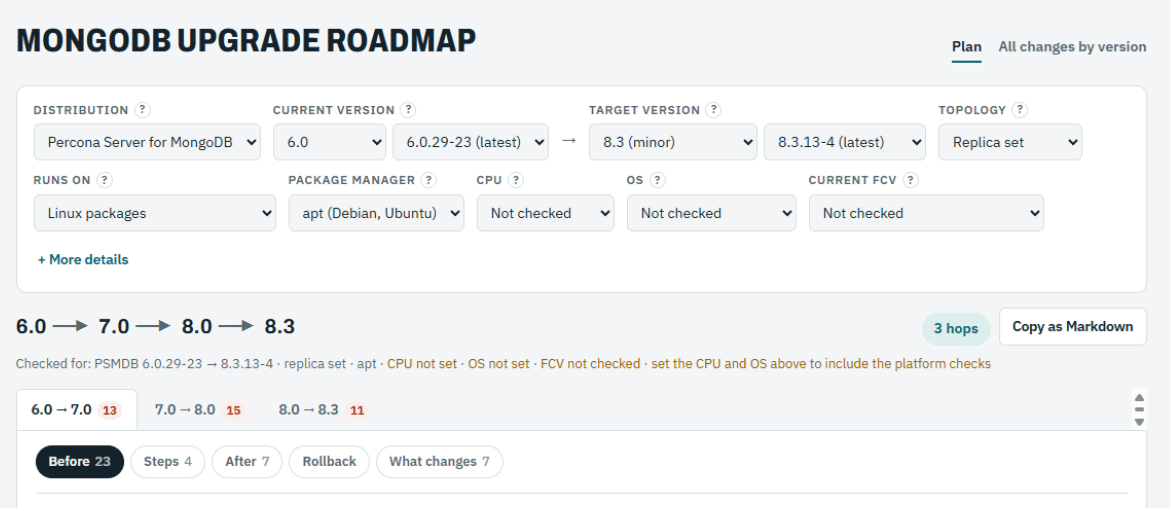
Pick Percona Server for MongoDB 6.0.29-23 as the current version, 8.3.13-4 as the target, a replica set and apt. The plan shows the path 6.0 to 7.0 to 8.0 to 8.3, three hops, with one tab per hop.
Each hop splits into Before, Steps, After, Rollback and What changes. For the 6.0 to 7.0 hop that is 23 pre-flight checks, 4 procedure steps and 7 post-upgrade checks. Each check has a checkbox, so you can track where you are, and Copy as Markdown puts the whole plan in your change ticket.
No. MongoDB supports upgrades one major version at a time, so 4.4 to 8.0 goes through 5.0, 6.0 and 7.0, and you set FCV at the end of each hop. The 8.2 and 8.3 minor releases follow their own documented paths.
After every member runs the new binaries and the cluster works as expected. Before that you can still go back to the previous binaries; after it, a downgrade is much harder.
Percona Software for PostgreSQL
Open source PostgreSQL software for production workloads
Model infrastructure requirements for PostgreSQL deployments.
Download PostgreSQL software and tools
Enterprise Support and Services
Expert help to run PostgreSQL in production
Open source MySQL for enterprise use
Percona Software for MySQL
Production-ready open source MySQL software
Compare DBaaS vs MySQL on Kubernetes cloud costs
Download MySQL software and tools
Enterprise Support and Services
Expert help to run MySQL in production
Enterprise-grade value for MongoDB®
Percona Software for MongoDB®
Source-available, enterprise-grade compatible software for MongoDB®
Compare MongoDB® deployment options, costs, and trade-offs.
Download MongoDB® software and tools
Enterprise Support and Services
Expert help to run MongoDB® in production
Run and manage Redis or Valkey
Discover the benefits of migrating from Redis to Valkey
Download Valkey software and tools
Enterprise Support and Services
Expert help to run Redis and Valkey in production
Monitoring & Management (PMM)
Coroot Percona Edition
Expert Consulting and Services
Your MongoDB cluster has been running fine for years on 4.4 or 6.0. Then the version goes end of life, a CVE shows up in an audit, or a new feature needs 8.0, and the MongoDB upgrade lands on your desk.
The upgrade itself is not hard. Knowing everything you have to check before, during and after each step is the hard part. We see the same pattern in support again and again: the upgrade stops halfway because one small requirement was buried in a page nobody opened.
MongoDB upgrades one major version at a time. Going from 4.4 to 8.0 means four hops (4.4 to 5.0, 6.0, 7.0 and 8.0), and each hop has its own upgrade page, its own compatibility notes and its own rollback rules. A few of the things that stop an upgrade halfway:
None of this is secret. It is spread across release notes, compatibility pages, driver tables and the docs for each tool, and you have to read all of it for every hop.
I built the MongoDB Upgrade Roadmap to put that documentation in one place. You tell it the current version, the target version and how the cluster runs. It returns every hop with:
It covers Percona Server for MongoDB and MongoDB Community, from 3.0 to 9.0, including the 8.2 and 8.3 minor releases. You can add your drivers, PBM, PMM and Operator versions, CPU and OS, and the plan checks them against each hop.
Three rules shaped it:
Pick Percona Server for MongoDB 6.0.29-23 as the current version, 8.3.13-4 as the target, a replica set and apt. The plan shows the path 6.0 to 7.0 to 8.0 to 8.3, three hops, with one tab per hop.
Each hop splits into Before, Steps, After, Rollback and What changes. For the 6.0 to 7.0 hop that is 23 pre-flight checks, 4 procedure steps and 7 post-upgrade checks. Each check has a checkbox, so you can track where you are, and Copy as Markdown puts the whole plan in your change ticket.
No. MongoDB supports upgrades one major version at a time, so 4.4 to 8.0 goes through 5.0, 6.0 and 7.0, and you set FCV at the end of each hop. The 8.2 and 8.3 minor releases follow their own documented paths.
After every member runs the new binaries and the cluster works as expected. Before that you can still go back to the previous binaries; after it, a downgrade is much harder.
本页为82搜索生成的网页快照,内容来自站内索引;演示数据的原文链接仅作示例。