网页
综合
更新时间 2026-09-29 15:33:33
Valkey Memory Optimization: Performance Benchmark Results - Percona
Enterprise-ready open source PostgreSQL
Percona Software for PostgreSQL
Open source PostgreSQL software for production workloads
Model infrastructure requirements for PostgreSQL deployments.
Download PostgreSQL software and tools
Enterprise Support and Services
Expert help to run PostgreSQL in production
Open source MySQL for enterprise use
Percona Software for MySQL
Production-ready open source MySQL software
Compare DBaaS vs MySQL on Kubernetes cloud costs
Download MySQL software and tools
Enterprise Support and Services
Expert help to run MySQL in production
Enterprise-grade value for MongoDB®
Percona Software for MongoDB®
Source-available, enterprise-grade compatible software for MongoDB®
Compare MongoDB® deployment options, costs, and trade-offs.
Download MongoDB® software and tools
Enterprise Support and Services
Expert help to run MongoDB® in production
Run and manage Redis or Valkey
Discover the benefits of migrating from Redis to Valkey
Download Valkey software and tools
Enterprise Support and Services
Expert help to run Redis and Valkey in production
Monitoring & Management (PMM)
Coroot Percona Edition
Expert Consulting and Services
This RAM/Memory reduction is most useful for Valkey 9.1 environments that are key string heavy. They are used extensively in caching, sessions/authentication, real-time apps, ecomm, Ad tech/martech, and gaming. These scenarios see a reduction of 37.5%, which has been attained in our testing environments versus version 7.2.. The biggest jump in the reduction came between 7.2 and 8.1 where the difference was 29.8%. Although the reduction doesn’t apply to every Valkey environment, those that are string heavy should experience 37.5% RAM reductions.
Starting point: 1 TB on Valkey 7.2
This post is based on a rigorous benchmark and a structural teardown of the source, aimed at answering three questions:
Five versions were tested — 7.2.14, 8.0.10, 8.1.9, 9.0.5, and 9.1.1 — all built from source, all using jemalloc 5.3.0 as the allocator, so version is the only variable.
Test Environment settings:
We can see that across roughly 632K unique keys, the size of per key averages 102.48 bytes in version 7.2.14 down to 64.02 bytes in 9.1.1 — a cumulative drop of 37.5%. In other words, the same hardware stores roughly 60% more of these small keys on 9.1 than it did on 7.2. We can see 8.1 alone accounts for the single biggest jump, at -23.8%, because that’s where the hash table got rewritten. However 9.0 shows basically zero change, since that release simply wasn’t targeting memory.
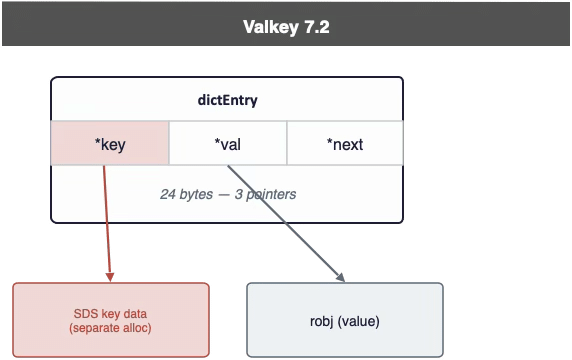
In 7.2, dictEntry is a classic three-pointer struct — *key, *val, *next — 24 bytes total. The catch is that the key itself is a pointer to a separately allocated SDS blob: every lookup pays for an extra malloc and an extra memory hop just to read the key.
8.0 introduces embeddedDictEntry: the key’s bytes are stored inline right after the struct. *val, *next, plus the inlined key data come to 16 bytes plus the key length — one allocation instead of two.
Result: −8 bytes per key, one fewer memory hop on every lookup, automatic on upgrade, no config changes needed.
This is the single largest jump in the whole series. In 8.0, the dictionary is a classic chained hash table: reaching a value means “bucket → entry → key → value” — four memory hops (plus two more per hash collision).
8.1 rewrites this as a new hashtable structure where one bucket is exactly 64 bytes — the size of a CPU cache line, — with the key and value embedded directly inside it.The bucket’s 8-byte metadata region packs a “has-child-bucket” bit, 7 filled-bits, and 7 bytes of secondary hash, letting most non-matching candidates be skipped without an extra memory access. Key and value are embedded in the same serverObject, shortening the path to roughly two hops — “bucket → serverObject” — and a hash collision usually stays within the same cache line.
Percona Software for PostgreSQL
Open source PostgreSQL software for production workloads
Model infrastructure requirements for PostgreSQL deployments.
Download PostgreSQL software and tools
Enterprise Support and Services
Expert help to run PostgreSQL in production
Open source MySQL for enterprise use
Percona Software for MySQL
Production-ready open source MySQL software
Compare DBaaS vs MySQL on Kubernetes cloud costs
Download MySQL software and tools
Enterprise Support and Services
Expert help to run MySQL in production
Enterprise-grade value for MongoDB®
Percona Software for MongoDB®
Source-available, enterprise-grade compatible software for MongoDB®
Compare MongoDB® deployment options, costs, and trade-offs.
Download MongoDB® software and tools
Enterprise Support and Services
Expert help to run MongoDB® in production
Run and manage Redis or Valkey
Discover the benefits of migrating from Redis to Valkey
Download Valkey software and tools
Enterprise Support and Services
Expert help to run Redis and Valkey in production
Monitoring & Management (PMM)
Coroot Percona Edition
Expert Consulting and Services
This RAM/Memory reduction is most useful for Valkey 9.1 environments that are key string heavy. They are used extensively in caching, sessions/authentication, real-time apps, ecomm, Ad tech/martech, and gaming. These scenarios see a reduction of 37.5%, which has been attained in our testing environments versus version 7.2.. The biggest jump in the reduction came between 7.2 and 8.1 where the difference was 29.8%. Although the reduction doesn’t apply to every Valkey environment, those that are string heavy should experience 37.5% RAM reductions.
Starting point: 1 TB on Valkey 7.2
This post is based on a rigorous benchmark and a structural teardown of the source, aimed at answering three questions:
Five versions were tested — 7.2.14, 8.0.10, 8.1.9, 9.0.5, and 9.1.1 — all built from source, all using jemalloc 5.3.0 as the allocator, so version is the only variable.
Test Environment settings:
We can see that across roughly 632K unique keys, the size of per key averages 102.48 bytes in version 7.2.14 down to 64.02 bytes in 9.1.1 — a cumulative drop of 37.5%. In other words, the same hardware stores roughly 60% more of these small keys on 9.1 than it did on 7.2. We can see 8.1 alone accounts for the single biggest jump, at -23.8%, because that’s where the hash table got rewritten. However 9.0 shows basically zero change, since that release simply wasn’t targeting memory.
In 7.2, dictEntry is a classic three-pointer struct — *key, *val, *next — 24 bytes total. The catch is that the key itself is a pointer to a separately allocated SDS blob: every lookup pays for an extra malloc and an extra memory hop just to read the key.
8.0 introduces embeddedDictEntry: the key’s bytes are stored inline right after the struct. *val, *next, plus the inlined key data come to 16 bytes plus the key length — one allocation instead of two.
Result: −8 bytes per key, one fewer memory hop on every lookup, automatic on upgrade, no config changes needed.
This is the single largest jump in the whole series. In 8.0, the dictionary is a classic chained hash table: reaching a value means “bucket → entry → key → value” — four memory hops (plus two more per hash collision).
8.1 rewrites this as a new hashtable structure where one bucket is exactly 64 bytes — the size of a CPU cache line, — with the key and value embedded directly inside it.The bucket’s 8-byte metadata region packs a “has-child-bucket” bit, 7 filled-bits, and 7 bytes of secondary hash, letting most non-matching candidates be skipped without an extra memory access. Key and value are embedded in the same serverObject, shortening the path to roughly two hops — “bucket → serverObject” — and a hash collision usually stays within the same cache line.
本页为82搜索生成的网页快照,内容来自站内索引;演示数据的原文链接仅作示例。