网页
综合
更新时间 2026-10-28 17:01:06
PIX 2610.28 - the biggest release of 2026 - PIX on Windows
Today we released PIX 2610.28, available for download here.
This release supports all the new retail and preview D3D12 features released today in DirectX Agility SDK 620 and 721. This is the first PIX build combining support for both retail and preview Agility SDKs, simplifying the user experience.
Beyond that, 2610.28 brings many new features and improvements since the last regular PIX release, PIX 2603.25, including all the features previewed in the May and June preview builds.
It also includes the most bug fixes we’ve ever released in a single version of PIX.
As always, many thanks to our hardware partners (AMD, Intel, NVIDIA and Qualcomm) for developing many of these features with us.
DirectX Dump Files are now available for use in retail games and applications! PIX has full support for analyzing them:
See the dedicated blog post for more information.
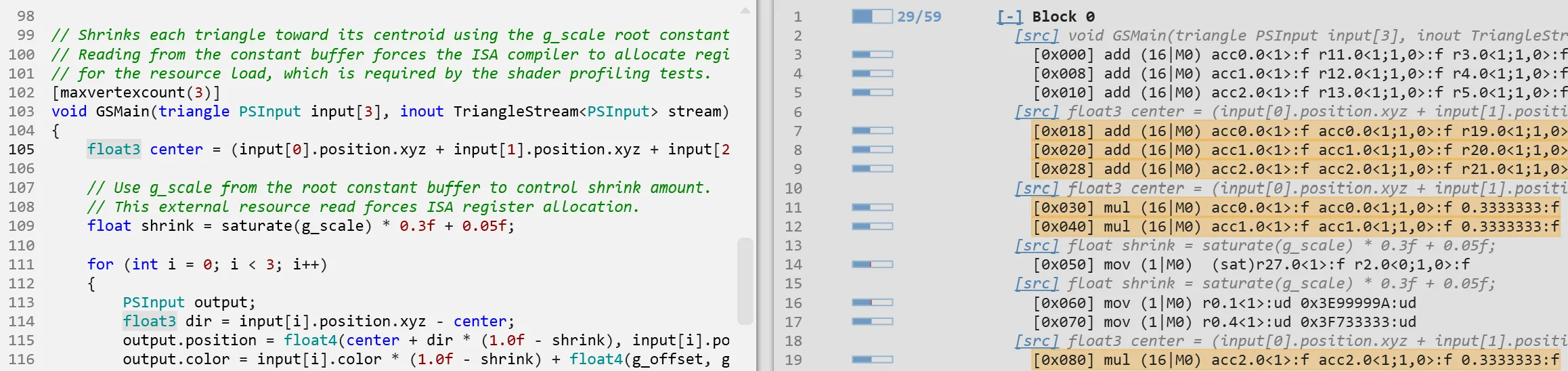
Shader Explorer is now available in main PIX releases, with offline and live shader analysis for supported AMD and Intel hardware.
We introduced the static-profiling workflow in the May preview. Start with a Compute, Graphics, or Mesh Shader Explorer project from File > New, choose a compiler and target architecture, and compile your source.
The analysis views provide:
This release adds the ability to collect live profiling data for a shader pipeline. PIX replays the captured workload in a GPU Capture and gathers instruction statistics from a compatible GPU plugin, then brings the results into Shader Explorer.
Instruction costs are accumulated across shader waves and loop iterations in the profiled event. Start with expensive instructions and inspect their correlated HLSL. Dependency and stall data can help explain the cost.
You can now export pipelines from GPU Captures to Shader Explorer.
To use the new export feature, open a GPU Capture file, select an eligible GPU event, start analysis, and choose Profile from the Pipeline view. PIX brings across the pipeline state and shader compilation information.
Export requires the shader source and compilation PDBs. The feature currently supports exporting traditional graphics and compute PSOs. Other pipelines like raytracing or work graphs will be available in a future PIX release.
For more details, see the Shader Explorer documentation.
This release includes support for all new D3D12 features in Agility SDKs 620 (retail) and 721 (preview) that were released today. It also adds support for some existing D3D12 features such as D3D12 video.
PIX adds support for the new ExecuteIndirectRTASOperations preview features, including GPU-driven acceleration structure operations and new ways to organize raytracing geometry:
Clusters and PTLAS support require a compatible preview runtime and GPU driver.
This release expands the partial-program support introduced in the May preview and included in June.
Improvements since June include:
PIX adds full capture/replay support for new D3D12 features, including:
PIX has long had the ability to work with applications that use D3D12 video APIs, but before this release, PIX would just capture the output of that video work.
PIX now has an opt-in setting to do full capture of D3D12 video decode, processing, and encoding work, with replay and C++ export support. This means that the full video APIs can be analyzed, and standard PIX features like buffer/texture viewers let you see the inputs/outputs of the video APIs.
You can enable the full video-capture option in PIX’s File->Settings page. It is off by default.
This support is marked as experimental for now, primarily because GPU plugins in PIX don’t support video queues so low-level hardware profiling information is not currently available. This will be fixed in a future version of PIX.
Over the years, PIX’s file format for GPU Captures has proven to be a large performance and feature bottleneck. Although it was robust in lots of ways, it prevented us from saving additional data back to the capture file and had to be decompressed linearly.
We’re therefore excited to announce a new file format for GPU Captures with this release, which removes these restrictions and unlocks some exciting features and performance gains.
We have more planned around this, but in this release: PIX is now able to save resolved PDBs into the capture file, Start Analysis is no longer bottlenecked by single-threaded decompression, and captured screenshots are now visible from File Explorer. See their sections below to learn more!
Note that PIX can convert old captures to the new file format, so your old captures can get all these benefits. You will be prompted to do so when opening an older capture file.
The new capture format lets PIX save resolved shader PDBs inside the GPU Capture itself. After resolving symbols through the configured search paths or Resolve PDB, save the capture to keep those PDBs with it. This means that reopening the file no longer requires finding those same PDBs again. It also means that you can send the updated file to a colleague, and PDBs will automatically resolve for them.
The new capture format also allows us to better multithread Start Analysis. As mentioned above, we no longer need to decompress the capture linearly and can instead throw it all off to a threadpool. For captures that are gigabytes in size, this is a great speed-up.
We’ve also dedicated lots of attention to improving performance in other areas of how PIX plays back a capture. Depending on your workload, you should see that PIX is noticeably faster, especially when collecting timing data.
This release finally brings one of the most requested quality-of-life features: the ability to view the captured screenshot directly from File Explorer. This is another feature that has been unlocked by the new file format and is very handy to distinguish between your different captures.
Application-Specific Driver State and Recreate-at-GPUVA are now enabled by default to improve capture correctness and compatibility with applications.
First introduced in the Ma
This release supports all the new retail and preview D3D12 features released today in DirectX Agility SDK 620 and 721. This is the first PIX build combining support for both retail and preview Agility SDKs, simplifying the user experience.
Beyond that, 2610.28 brings many new features and improvements since the last regular PIX release, PIX 2603.25, including all the features previewed in the May and June preview builds.
It also includes the most bug fixes we’ve ever released in a single version of PIX.
As always, many thanks to our hardware partners (AMD, Intel, NVIDIA and Qualcomm) for developing many of these features with us.
DirectX Dump Files are now available for use in retail games and applications! PIX has full support for analyzing them:
See the dedicated blog post for more information.
Shader Explorer is now available in main PIX releases, with offline and live shader analysis for supported AMD and Intel hardware.
We introduced the static-profiling workflow in the May preview. Start with a Compute, Graphics, or Mesh Shader Explorer project from File > New, choose a compiler and target architecture, and compile your source.
The analysis views provide:
This release adds the ability to collect live profiling data for a shader pipeline. PIX replays the captured workload in a GPU Capture and gathers instruction statistics from a compatible GPU plugin, then brings the results into Shader Explorer.
Instruction costs are accumulated across shader waves and loop iterations in the profiled event. Start with expensive instructions and inspect their correlated HLSL. Dependency and stall data can help explain the cost.
You can now export pipelines from GPU Captures to Shader Explorer.
To use the new export feature, open a GPU Capture file, select an eligible GPU event, start analysis, and choose Profile from the Pipeline view. PIX brings across the pipeline state and shader compilation information.
Export requires the shader source and compilation PDBs. The feature currently supports exporting traditional graphics and compute PSOs. Other pipelines like raytracing or work graphs will be available in a future PIX release.
For more details, see the Shader Explorer documentation.
This release includes support for all new D3D12 features in Agility SDKs 620 (retail) and 721 (preview) that were released today. It also adds support for some existing D3D12 features such as D3D12 video.
PIX adds support for the new ExecuteIndirectRTASOperations preview features, including GPU-driven acceleration structure operations and new ways to organize raytracing geometry:
Clusters and PTLAS support require a compatible preview runtime and GPU driver.
This release expands the partial-program support introduced in the May preview and included in June.
Improvements since June include:
PIX adds full capture/replay support for new D3D12 features, including:
PIX has long had the ability to work with applications that use D3D12 video APIs, but before this release, PIX would just capture the output of that video work.
PIX now has an opt-in setting to do full capture of D3D12 video decode, processing, and encoding work, with replay and C++ export support. This means that the full video APIs can be analyzed, and standard PIX features like buffer/texture viewers let you see the inputs/outputs of the video APIs.
You can enable the full video-capture option in PIX’s File->Settings page. It is off by default.
This support is marked as experimental for now, primarily because GPU plugins in PIX don’t support video queues so low-level hardware profiling information is not currently available. This will be fixed in a future version of PIX.
Over the years, PIX’s file format for GPU Captures has proven to be a large performance and feature bottleneck. Although it was robust in lots of ways, it prevented us from saving additional data back to the capture file and had to be decompressed linearly.
We’re therefore excited to announce a new file format for GPU Captures with this release, which removes these restrictions and unlocks some exciting features and performance gains.
We have more planned around this, but in this release: PIX is now able to save resolved PDBs into the capture file, Start Analysis is no longer bottlenecked by single-threaded decompression, and captured screenshots are now visible from File Explorer. See their sections below to learn more!
Note that PIX can convert old captures to the new file format, so your old captures can get all these benefits. You will be prompted to do so when opening an older capture file.
The new capture format lets PIX save resolved shader PDBs inside the GPU Capture itself. After resolving symbols through the configured search paths or Resolve PDB, save the capture to keep those PDBs with it. This means that reopening the file no longer requires finding those same PDBs again. It also means that you can send the updated file to a colleague, and PDBs will automatically resolve for them.
The new capture format also allows us to better multithread Start Analysis. As mentioned above, we no longer need to decompress the capture linearly and can instead throw it all off to a threadpool. For captures that are gigabytes in size, this is a great speed-up.
We’ve also dedicated lots of attention to improving performance in other areas of how PIX plays back a capture. Depending on your workload, you should see that PIX is noticeably faster, especially when collecting timing data.
This release finally brings one of the most requested quality-of-life features: the ability to view the captured screenshot directly from File Explorer. This is another feature that has been unlocked by the new file format and is very handy to distinguish between your different captures.
Application-Specific Driver State and Recreate-at-GPUVA are now enabled by default to improve capture correctness and compatibility with applications.
First introduced in the Ma
本页为82搜索生成的网页快照,内容来自站内索引;演示数据的原文链接仅作示例。