网页
综合
更新时间 2026-11-13 15:39:29
JetBrains Air: One system for building software with agents
Works with the agents you already use Claude AgentCodexJunieCopilotOpenCodeand any you can connect via ACP.
Choose where you work:
Core project behind the Air ADE — dev and analytics repos
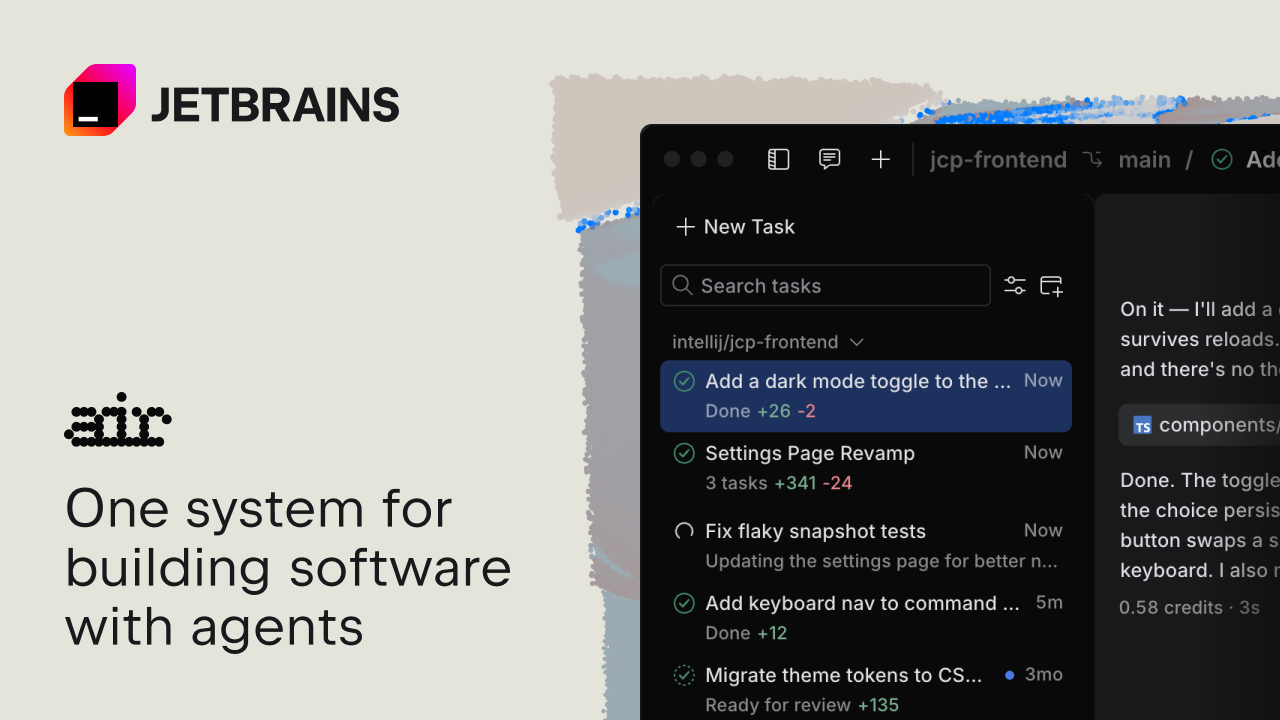
Add a dark mode toggle to the site header
On it — I’ll add a dark-mode toggle to the site header and persist the choice so it survives reloads. Scanning the project: the header lives in components/Header.tsx and there’s no theme provider yet, so I’ll add a small useTheme hook alongside it.
Done. The toggle is wired to a small useTheme hook backed by React context, and the choice persists to localStorage so the site reopens in the last-used mode. The button swaps a sun/moon icon, exposes aria-pressed, and is reachable by keyboard. I also moved the header’s hard-coded colors to CSS variables.
Default to the system color scheme on first visit
Good call — I’ll read the system preference on first load and only override it once the user picks a theme, so returning visitors keep their choice.
Done. First-time visitors now inherit their OS light/dark setting, and the toggle still wins and persists after that. I also added a listener so the site follows OS changes until a manual choice is made.
Agents run in the cloud, so work isn’t tied to one machine or team member. Cloud runs are already available for some customers in JetBrains IDEs and the browser. Rollout to all remaining customers will happen gradually over the coming months.
Keep several projects open, each with its own sessions, and track unread updates, changed files, and outgoing commits in all of them.
Air finds compatible agents on your machine and lets you connect them with a click. You can also add new ones from the agent registry.
Open diffs directly from an agent session, validate changes with your IDE tools, and leave comments on specific lines for the agent to act on.
Bring your existing provider subscription or API keys, or even base URL. You can also use JetBrains AI with credits billed at public API rates. Switch between subscriptions – even mid-session.
Teams collaborate and run agent tasks in dedicated cloud environments. Invite others and manage access from one place.
Delegate repeatable tasks to coding agents. Set up automations for code review, release notes, fixes, and more.
Dedicated cloud environments for every project. Set the VM size, control internet access, and securely manage variables and secrets.
Connect MCP servers once so your team and their agents can securely use the same external tools.
Give developers access to the models and agents they need. Set permissions for the whole organization or tailor them to specific teams or individuals.
Direct AI spend where it adds the most value, with flexible limits for teams and individual contributors.
Bring your own keys from Amazon Bedrock, OpenAI, Anthropic, or any other provider. Add your key once to give all your developers access.
Track which tools your teams use and where AI contributes the most.
Work with the most cost efficient coding agent.
Agents start with an understanding of your project instead of scanning the entire codebase. Air Context’s semantic indexing speeds up execution and lowers the cost of working in production-scale repositories.
Use JetBrains-managed access, or bring your own AI subscription or API key.
Install the plugin and run agents inside JetBrains IDEs.
Work from any machine and share sessions with your team.
Bring terminal agents like Claude Code and Codex into Air.
Choose where you work:
Core project behind the Air ADE — dev and analytics repos
Add a dark mode toggle to the site header
On it — I’ll add a dark-mode toggle to the site header and persist the choice so it survives reloads. Scanning the project: the header lives in components/Header.tsx and there’s no theme provider yet, so I’ll add a small useTheme hook alongside it.
Done. The toggle is wired to a small useTheme hook backed by React context, and the choice persists to localStorage so the site reopens in the last-used mode. The button swaps a sun/moon icon, exposes aria-pressed, and is reachable by keyboard. I also moved the header’s hard-coded colors to CSS variables.
Default to the system color scheme on first visit
Good call — I’ll read the system preference on first load and only override it once the user picks a theme, so returning visitors keep their choice.
Done. First-time visitors now inherit their OS light/dark setting, and the toggle still wins and persists after that. I also added a listener so the site follows OS changes until a manual choice is made.
Agents run in the cloud, so work isn’t tied to one machine or team member. Cloud runs are already available for some customers in JetBrains IDEs and the browser. Rollout to all remaining customers will happen gradually over the coming months.
Keep several projects open, each with its own sessions, and track unread updates, changed files, and outgoing commits in all of them.
Air finds compatible agents on your machine and lets you connect them with a click. You can also add new ones from the agent registry.
Open diffs directly from an agent session, validate changes with your IDE tools, and leave comments on specific lines for the agent to act on.
Bring your existing provider subscription or API keys, or even base URL. You can also use JetBrains AI with credits billed at public API rates. Switch between subscriptions – even mid-session.
Teams collaborate and run agent tasks in dedicated cloud environments. Invite others and manage access from one place.
Delegate repeatable tasks to coding agents. Set up automations for code review, release notes, fixes, and more.
Dedicated cloud environments for every project. Set the VM size, control internet access, and securely manage variables and secrets.
Connect MCP servers once so your team and their agents can securely use the same external tools.
Give developers access to the models and agents they need. Set permissions for the whole organization or tailor them to specific teams or individuals.
Direct AI spend where it adds the most value, with flexible limits for teams and individual contributors.
Bring your own keys from Amazon Bedrock, OpenAI, Anthropic, or any other provider. Add your key once to give all your developers access.
Track which tools your teams use and where AI contributes the most.
Work with the most cost efficient coding agent.
Agents start with an understanding of your project instead of scanning the entire codebase. Air Context’s semantic indexing speeds up execution and lowers the cost of working in production-scale repositories.
Use JetBrains-managed access, or bring your own AI subscription or API key.
Install the plugin and run agents inside JetBrains IDEs.
Work from any machine and share sessions with your team.
Bring terminal agents like Claude Code and Codex into Air.
本页为82搜索生成的网页快照,内容来自站内索引;演示数据的原文链接仅作示例。